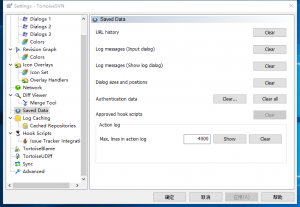
不管什么原因,使用TortoiseSVN总是有需要更换用户的时候,这个时候需要去设置里面清除存储的认证信息:
(1)开始菜单打开 setting
(2)选择左边的saved data
(3)点击authentication data 右边的clear 或者 clear all
(4)重新登陆的时候就会有登陆提示了
Your email address will not be published. Required fields are marked *
Comment *
Name *
Email *
Website
Save my name, email, and website in this browser for the next time I comment.
Δ